METAR Flight Instructor
The ultimate Garmin watch face for pilots. Real-time aviation weather, intelligent runway advisor, and crosswind calculations in a professional-grade watch face.
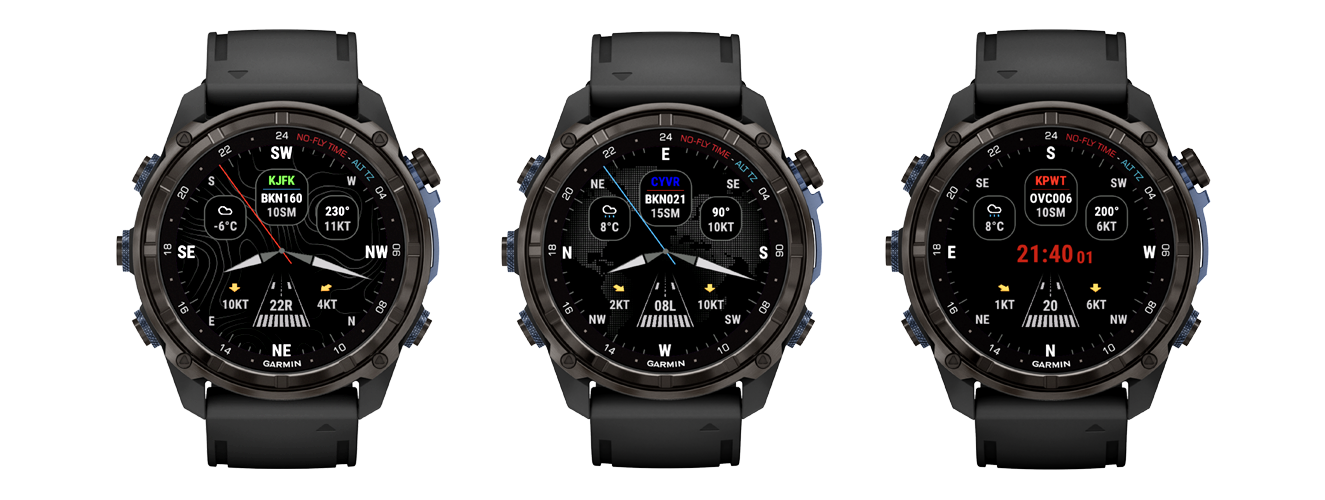
Real-time METAR
AVWX Powered
Live Wind, Visibility, & Ceiling Levels
Runway Advisor
Smart Logic
Best RWY Calculations
Global Coverage
5,000+ Airports
ICAO/IATA Airport Support
Built for Flight Instructors & Students
Turn complex METAR data into immediate, teachable insights. Designed to help you teach better and fly safer.
Intelligent Runway Advisor
Instantly visualize the best takeoff and landing runway based on real-time headwind and crosswind components. Perfect for demonstrating decision making.
Color-Coded Categories
Standard aviation color cues (VFR, MVFR, IFR, LIFR) allow for instant condition recognition and safer go/no-go decisions.
Crosswind Math
Automated precise wind component calculations eliminate mental math errors and help verify student calculations.
Decoded Weather
Plain-language readout of Wind, Visibility, Sky Conditions, and Temperature. No more decoding raw strings mid-flight.
Cockpit - Ready Information
Optimized for quick glances during preflight and pattern work.
Wind & Gusts
Direction, Speed, and Gusts
Direct ReadoutVisibility
Clear Visual Limits
Statute Miles/MetersCloud Layers
Ceiling & Sky Condition
AGL HeightsTemp / Dew Point
Outside Air Temperature & Dew Point
°C or °FAltimeter
Pressure Setting
inHg or hPaFlight Category
VFR, MVFR, IFR, LIFR
Color BandIntelligent Runway Logic
METAR Flight Instructor doesn't just show the wind - it understands it. The watch face analyzes the current METAR against available runways to calculate headwind and crosswind components instantly.
Runway 22R
Best Wind Component
5 KT
Headwind
METAR DATA
KJFK 251851Z 21005G10KT 10SM FEW045 18/12 A3015
- Best Runway Cue
- Quickly identify optimal takeoff and landing direction.
- Teaching Tool
- Demonstrate how runway selection changes with wind shifts.
- Live Updates
- Configurable refresh intervals match your flight tempo.
Ready in Minutes
Simple setup so you can focus on the flying.
Install
Get METAR Flight Instructor from the Garmin Connect IQ Store.
Open Settings
Configure the watch face via the Garmin Connect IQ app.
Set Airport Ident
Enter your home or training airport ICAO code (e.g. KORD).
Fly
Sync your watch. (This may take up to 5 min due to a sync cycle timeout)
Elevate Your Cockpit Awareness
Join thousands of pilots using METAR Flight Instructor for safer, smarter flying.Try it risk-free with our 2-day unlimited trial.