METAR Digital (Decoded Aviation Weather)

Decoded Aviation Weather for Pilots
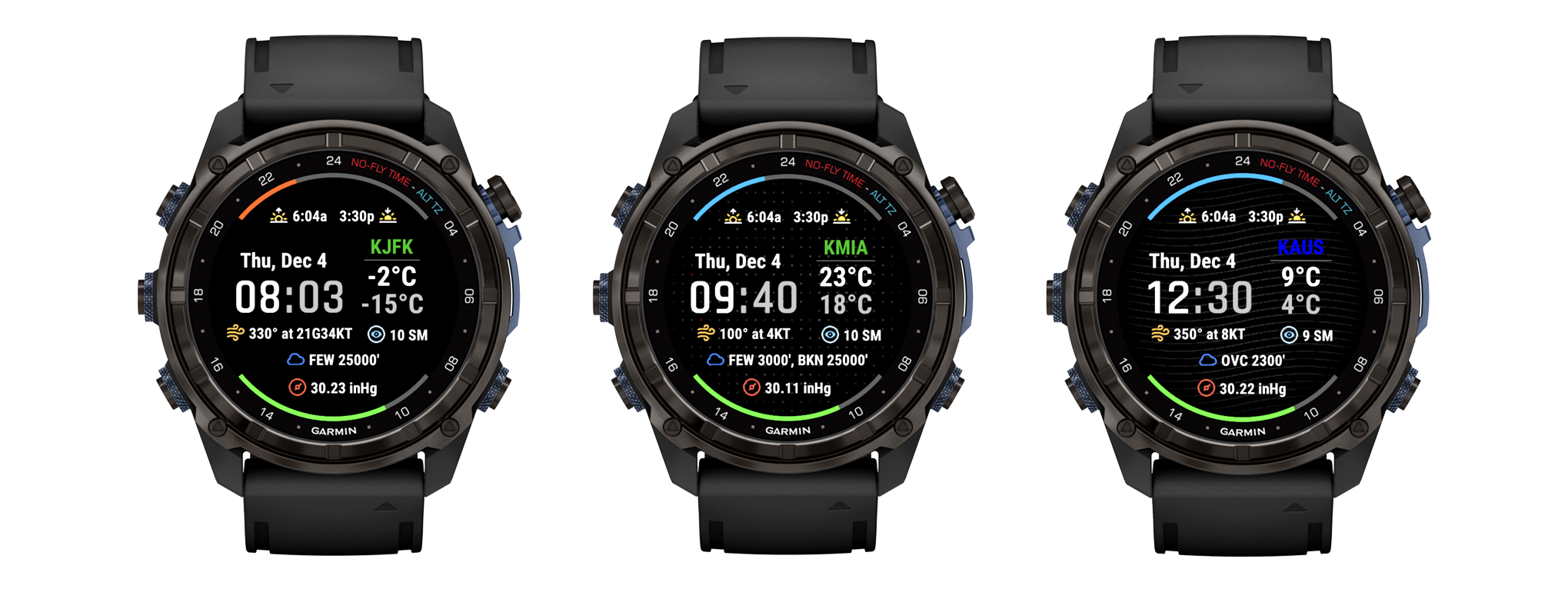
METAR Digital (Decoded Aviation Weather) for Garmin Watch

Get decoded aviation weather on your Garmin smartwatch with METAR Digital. Display real-time METAR data including wind, visibility, ceiling, temperature, and flight categories (VFR, MVFR, IFR, LIFR) directly on your wrist. Perfect for pilots who need instant weather awareness before and during flights.

Key Features of METAR Digital Watch Face

Decoded METAR data, flight category awareness, and essential timekeeping for pilots—all on your Garmin smartwatch

Decoded METAR on the Watch

Wind, visibility, ceiling/sky, temperature/dew point, and altimeter—clearly presented and easy to scan. No need to decode complex weather strings.

Flight Category Colors

VFR, MVFR, IFR, LIFR with user-selectable colors for instant "go/no-go" awareness. Customize the colors to match your preferences.

Sun Cycle Arc

Top arc shows time remaining to the next sunrise or sunset, plus sunrise/sunset times. Perfect for planning day/night operations.

Battery Arc

Bottom arc indicates remaining battery level at a glance. Never be caught off guard with a dead watch.

Crisp Time & Date

Large digital time with 12/24-hour formats, day of week, and date. Easy to read in any lighting condition.

Flexible Units & Personalization

Choose °C/°F, knots/m·s, statute miles/meters, inHg/hPa. Multiple background patterns to match your style.

Aviation Weather Data Display

All essential METAR weather data decoded and displayed clearly on your Garmin watch

Wind

Direction and speed in your chosen units (knots or m/s). Includes gust information when present.

Visibility

Displayed in statute miles or meters, depending on your preference.

Ceiling & Sky

SCT/BKN/OVC layers with altitudes. Shows cloud coverage and heights for flight planning.

Temperature & Dew Point

In °C or °F. Helps assess density altitude and fog/icing potential.

Altimeter Setting

Displayed in inHg or hPa for accurate altitude calculations.

How to Install METAR Digital on Your Garmin Watch

Get your aviation weather watch face running in minutes with these simple steps

1

Install the METAR Digital App

Download from the Garmin Connect IQ Store on your phone or through the Garmin Express desktop application.

2

Open Watch Face Settings

In the Garmin Connect IQ mobile app, navigate to the watch face settings for METAR Digital.

3

Configure Your Preferences

Enter your home airport ICAO code and choose your preferred units, flight category colors, time format (12/24-hour), and background style.

4

Sync and Enjoy

Sync your watch. Your decoded METAR will appear on the watch face (may take up to 5 minutes for the first sync).

Optional: GPS Locator Helper App

Optional free companion app for real-time location updates and enhanced accuracy

Real-Time Position Updates

While the watch face can use the last known location, you can manually update your position in real time with the free "GPS Locator" helper app—perfect for pre-flight prep or post-flight repositioning. Triggered with a long press, this tool ensures precision location awareness on demand.

Download GPS Locator (FREE)

Compatible Garmin Watches

METAR Digital works with modern Garmin Connect IQ smartwatches including AMOLED displays

Optimized For

  • AMOLED screen devices
  • Garmin D2 Series
  • Fenix 7/8 Series
  • Epix Series

Also Compatible

  • Forerunner Series
  • Vivoactive Series
  • Venu Series
  • Other Connect IQ devices

Note: Background patterns may not display as intended on some non-AMOLED devices. Choose a simple background if needed.

Download METAR Digital for Your Garmin Watch

Get instant decoded aviation weather on your Garmin smartwatch. METAR Digital provides real-time flight category indicators, wind data, visibility, and more. Available now on Garmin Connect IQ Store for pilots and aviation enthusiasts.